
 +44 20 3695 6722
 Sign in
DDoS protection is a complex field with many nuances. How do you choose the right provider and pricing plan for your needs? What should you do if an attack has already started? How can a cloud-based solution be integrated into your infrastructure? Below, we answer these and other frequently asked questions.
- What Are the Most Common and Dangerous DDoS Attacks?
- How Serious Is the DDoS Threat to Organizations?
- Which DDoS Protection Methods Exist?
- Can DDoS Protection Be Handled In-House?
- How Do You Choose the Right Anti-DDoS Provider?
- How to Avoid Overpaying for Protection?
- How to Spot the Start of a DDoS Attack?
- What to Do During a DDoS Attack?
- How DDoS Attacks Impact SEO?
- How Can External Protection Be Integrated Quickly?
- How to Safely Migrate to Another Anti-DDoS Service Without Downtime?
- Is It Possible to Use Two Protection Providers at the Same Time?
- How Should IT Teams and Cloud Providers Share Responsibilities?
- How to Apply Different Protection Rules for Multiple Domains?
- How Does Cloud Traffic Filtering Work Compared to On-Prem?
- Can the Provider See All Traffic, and How Is Data Protected?
- What Happens If the Paid Service Expires During an Attack?
What Are the Most Common and Dangerous DDoS Attacks?
Attackers continuously refine their tactics and increase attack intensity and scale. Today, several key types of DDoS attacks stand out as the most significant threats:
- Multi-vector attacks. Threat actors target infrastructure at multiple layers of the OSI model (L3, L4, L7), combining different methods to disrupt both networks and applications.
- Carpet bombing attacks. Malicious traffic is simultaneously directed at a large number of IP addresses in order to cause maximum damage to the target.
- Probing attacks. Attackers first conduct reconnaissance, identifying vulnerabilities in security mechanisms and infrastructure, and then launch a more destructive attack against the weakest points.
- Automated attacks. These attacks rely on botnets — networks of infected devices that are remotely controlled.
- Targeted DDoS attacks. Instead of overwhelming entire services, these attacks focus on disabling specific business-critical functions such as payments, authentication, and order processing.
How Serious Is the DDoS Threat to Organizations?
In recent years, the threat has only intensified. In 2025, analysts at StormWall identified the following global trends:
- The number of DDoS attacks increased by 198% compared to 2024.
- The average attack duration increased to 31 minutes.
- The primary targets of attackers were the financial sector, telecommunications, and the public sector.
- The average botnet attack capacity increased by 2.5x. As evidence, the AISURU botnet attack reached 29.7 Tbps, setting a new world record.
- The number of probing DDoS attacks increased fourfold.
- The number of multi-vector attacks grew by 83% year over year.
- The power of carpet bombing attacks continued to rise, with the largest recorded attack of this type reaching 4.8 Tbps.
Read more: The DDoS Landscape in 2025: Key Changes and Emerging Threats
Today, almost any organization that operates online can become a target of a DDoS attack. The larger and more visible the organization is in the public space, the higher the risks — and the more serious the potential losses.
Which DDoS Protection Methods Exist?
The ultimate goal of DDoS protection is to secure all OSI layers and neutralize complex, multi-vector threats. Three main categories of protection methods can be identified:
- Network-layer protection against volumetric and transport-layer attacks (L3-L4). Cloud-based traffic scrubbing centers play a key role here: incoming traffic is filtered within the provider’s distributed infrastructure and only then forwarded to the client’s servers. Basic infrastructure hygiene is also critical, including network segmentation, router-level rate limiting, disabling unused services, and regular software patching to eliminate known vulnerabilities.
- Application-layer (L7) protection. This type of protection is designed for web applications, APIs, and mobile backends.
- Protection against adaptive and automated DDoS attacks. These include Web Application Firewalls (WAF) and anti-bot solutions. They protect against a wide range of threats, including hacking attempts, data exfiltration attempts, and malicious bot activity. However, they are not sufficient to stop large-scale volumetric DDoS attacks on their own, so they should be used in combination with network traffic filtering systems.
Can DDoS Protection Be Handled In-House?
From a technical perspective, there are two main approaches:
- Configuring traffic filtering at the infrastructure level using web servers, network firewalls, and operating systems. This typically includes per-IP rate limiting, geo-based blocking, and the use of specialized protection modules.
- Scaling infrastructure, such as leasing additional bandwidth, building server clusters, and distributing traffic across multiple nodes.
However, building in-house DDoS protection requires significant investment and is rarely capable of withstanding modern high-volume and multi-vector attacks. Even an attack of moderate intensity can fully saturate internet uplinks, making on-prem equipment ineffective — legitimate traffic may not reach your servers at all. Modern attacks, especially at the application layer (L7), easily bypass basic filters, with bots imitating real user behavior. Distinguishing such traffic from legitimate requests is extremely challenging without advanced behavioral analysis tools.
Effective protection of IT infrastructure against DDoS attacks requires high-performance filtering infrastructure and dedicated security specialists. If your networks or services are critical to business operations, using a professional cloud-based anti-DDoS service is significantly more reliable and cost-effective.
How Do You Choose the Right Anti-DDoS Provider?
We recommend evaluating providers based on the following criteria:
- The provider should offer mitigation across L3–L7 layers, along with additional defenses such as anti-bot and WAF to counter automated and application-level threats.
- The service has high network capacity and enough performance headroom to absorb large-scale attacks.
- The provider operates a distributed filtering network, ideally with traffic scrubbing centers in your region.
- Attack response time of a few seconds, guaranteed uptime of 99.2% or higher, and a near-zero false-positive rate.
- The vendor offers transparent and flexible pricing, ideally with the option of a free trial period.
- The client portal provides full control over protection settings along with detailed analytics.
- The solution can scale as traffic grows and attack volumes increase.
- The provider offers fast and responsive 24/7 support.
Read more: How to choose a DDoS protection service
How to Avoid Overpaying for Protection?
Start with a few simple steps:
- Identify your most business-critical assets, such as a website, API, or servers.
- Conduct an infrastructure audit to identify any potential bottlenecks that may fail under high traffic loads.
- Assess the volume of traffic passing through your networks and services.
These steps help you forecast realistic threat scenarios. Large corporations or government organizations may face attacks reaching 1 Tbps. For small businesses, such scenarios are far less likely — they are more often targeted by application-layer attacks that mimic legitimate user behavior. For a low-traffic website, a basic plan with limited functionality may be sufficient to protect a single domain.
Another useful approach is to compare the cost of DDoS protection with the cost of downtime, including both financial and reputational losses. For example, if your website is unavailable for several hours, how many customers might you lose? How much could search engine traffic drop? Are there any penalties for failing to meet service availability requirements? How could the attack affect your brand image? How many resources would be needed for recovery? In many cases, potential losses can far exceed the cost of professional DDoS protection.
How to Spot the Start of a DDoS Attack?
Key warning signs include:
- Abnormal traffic growth. For example, within a few hours, website visits or registrations may spike sharply, or file downloads may multiply. If there is no clear reason for this activity — such as seasonal trends or recent marketing campaigns — your resources could be under a DDoS attack.
- Unusual visitor geography. If your website was previously visited mainly by users from Europe, but you suddenly see a surge of traffic from Indonesia or Bangladesh, this may indicate an attack.
- Performance degradation. Websites and services become slower, page load times increase, and connection errors occur more frequently.
You should also watch for failures in specific features, incorrect content display, and other unusual behavior.
Monitoring is essential for quickly detecting DDoS attacks. You can manually review server logs to identify suspicious IP addresses and unusual request patterns, track page load speeds, and monitor the availability of critical components. Traffic anomalies and visitor geography can be tracked using web analytics tools such as Google Analytics.
Automated monitoring with specialized security tools can make this process even easier. For example, a WAF continuously analyzes traffic quality, filters suspicious requests, and alerts you to anomalies.
The earlier a DDoS attack is detected, the greater the chance of minimizing downtime and preventing serious impact.
Read more: The Impact of DDoS Attacks on Businesses
What to Do During a DDoS Attack?
Prepare a DDoS incident response plan in advance and clearly define responsibilities. Set up basic monitoring to detect traffic anomalies. Review your protection strategy regularly — at least once a year — as the threat landscape is constantly evolving. Be sure to conduct training exercises so your team knows how to respond under pressure.
How to Respond During a DDoS Attack?
- Assess the scale of the attack and its potential impact. A fast response is critical. Do not try to “wait out” a powerful attack or manually filter traffic — this is ineffective, since your internet links are already overloaded.
- Follow your action plan. If you use a cloud-based service, immediately activate protection through your anti-DDoS provider. At the same time, notify your hosting provider or internet service provider — they may apply additional filtering at their level.
- Assemble a response team to coordinate actions and incident monitoring. This team may include an information security specialist to communicate with the provider, a system administrator to check service availability, and a person responsible for external communications. Start recording all details — when the attack occurred, its vector, target IP addresses and ports, and logs. This information is essential for post-incident analysis and may be required if you contact law enforcement.
- Inform customers promptly via social media or your website (if the attack is visible to end users). Transparent communication helps maintain trust.
If you do not have an action plan or active protection in place, we recommend contacting a vendor immediately. Specialized companies have established procedures for quickly activating anti-DDoS services even during an ongoing attack.
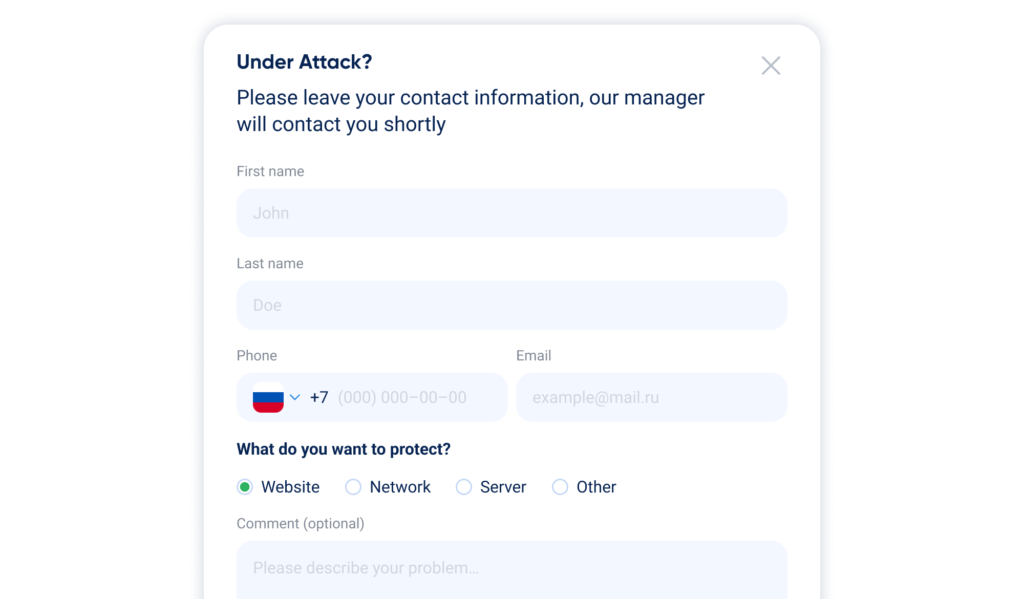
This is the contact form on the StormWall website for organizations currently under attack. We process such requests as quickly as possible — application review and protection activation take just a few minutes.
How DDoS Attacks Impact SEO?
Search engines do not detect the attack itself, but its consequences directly impact a website’s technical performance. The impact occurs in two key areas.
- Website Availability and Loading Speed
If a server is overloaded or unresponsive, response times increase. Search engines consider such websites to provide a poor user experience and lower their rankings. Google and Bing, in particular, evaluate how long the disruption lasts: a short outage of a couple of hours may go unnoticed, but repeated or prolonged downtime lasting more than 2-3 days becomes critical.
An indirect impact is that search engine crawlers may be unable to update site data. Indexing errors can occur — new pages are not added, while existing pages may temporarily drop out of the index.
- Behavioral Factors
When users leave a non-functioning website en masse, bounce rates rise sharply and session depth decreases. In addition, application-layer attacks often involve “smart” bots that visit key pages and immediately leave. Search engines interpret this behavior as users failing to find relevant information and may downgrade the site in search results.
How to minimize the SEO impact of an attack:
- Implement basic protection. Use a Content Delivery Network (CDN) to cache content and speed up page loading, and deploy a Web Application Firewall (WAF) to filter malicious traffic at the application layer.
- Set up monitoring and rate limits. Regularly monitor traffic using analytics tools to detect attacks early. Configure request rate limits per IP address on critical parts of the site, such as login or payment forms.
- Restore search engine access after the attack. If the attack caused prolonged downtime, once it is mitigated, check the site’s accessibility for search engine crawlers via Google Search Console. If necessary, submit an updated sitemap for expedited re-crawling.
How Can External Protection Be Integrated Quickly?
Two main technologies are typically used.
- DNS Record Changes
This is the simplest way to protect websites and web applications. You delegate your domain to the provider’s name servers or change the domain’s A record to the protected IP address provided by the service. All incoming traffic is then routed through the provider’s cloud-based filtering infrastructure.
The downside of this method is DNS propagation delay, as well as the complexity of managing protection across a large number of domains. In addition, if attackers know the server’s real IP address, they can target it directly, bypassing the protection.
- BGP Announcement (Network-Level Traffic Redirection)
This method is designed to protect an entire network or specific IP prefixes and does not rely on DNS. You or your hosting provider announce your IP addresses via the BGP protocol and redirect all incoming traffic through the protection provider’s scrubbing system.
This approach enables near-instant traffic switching and provides effective mitigation of attacks targeting IP addresses. However, it requires ownership of public IP address space and more complex network configuration.
Most providers can activate protection within 10-30 minutes. However, when DNS records are changed, there is an important nuance: protection may become active within minutes, but full deployment can take several hours due to DNS caching. If a service is already under attack, additional mitigation measures may be required.
How to Safely Migrate to Another Anti-DDoS Service Without Downtime?
In most cases, migration requires changes to DNS settings, server configuration, and network parameters. Below is a basic migration workflow, which may vary depending on the provider:
- Prepare the setup in the new provider’s client portal: add the domain, enable protection, and obtain a protected cloud IP address for backend configuration. If you already have an SSL certificate, upload it to the platform.
- Update DNS records in the domain management panel or keep them with your current registrar. Make sure proxying is disabled for all DNS records.
- Apply server-side configuration settings. Update IP addresses where possible and disable direct access via the server’s primary IP address.
- Remove the domain from the management panel of the previously used DDoS protection service to avoid conflicts.
- Configure filtering rules in the new provider’s client portal, including protection mode, geo-filtering, blacklists and whitelists, and other security settings.
Is It Possible to Use Two Protection Providers at the Same Time?
Yes, this is possible. It allows the creation of two or more independent internet channels, so if one is fully saturated by an attack, your services remain available. In practice, one provider usually handles the full traffic scrubbing cycle across layers L3-L7, while a second provider acts as a backup in case the primary provider encounters issues.
Automatic switching between these channels is typically handled by a router or firewall that supports Dual-WAN or load-balancing. If protection is deployed via DNS record changes, the minimum TTL value is usually configured. TTL defines how long DNS data is cached, and reducing it allows faster switching. When using BGP, your IP addresses can be announced simultaneously across multiple protection providers’ networks.
How Should IT Teams and Cloud Providers Share Responsibilities?
Responsibility distribution depends on the service delivery model:
- IaaS (Infrastructure-as-a-Service). This model involves renting virtual infrastructure from a cloud provider. The provider protects only the services it delivers to customers and assumes fewer responsibilities compared to other models.
- PaaS (Platform-as-a-Service). The provider delivers a ready-made platform for application development and management. It is responsible for basic network availability, while application-level security remains the customer’s responsibility.
- SaaS (Software-as-a-Service). In this model, the service provider is fully responsible for DDoS protection across all layers.
When working with external vendors, a partnership model is usually the most effective. Here, the internal security team defines strategy and coordinates actions, while the provider handles operational and tactical execution.
This is how such a model may look in practice:
| Responsibility area | Internal team responsibilities | Anti-DDoS provider responsibilities |
| Strategy and control | Risk management, budgeting, provider selection, and SLA approval | Consulting, analytics, and recommendations for improving protection |
| Monitoring | Monitoring the availability of internal services and coordinating incident response | 24/7 traffic monitoring and filtering, attack mitigation, and initial alerts |
| Technical implementation | DNS/BGP configuration for traffic redirection and integration of monitoring systems | Maintenance and scaling of the protection infrastructure |
| Incident response | Analysis of application logs, service recovery, and communication with business stakeholders | DDoS detection, traffic analysis and scrubbing, and incident reporting |
How to Apply Different Protection Rules for Multiple Domains?
The available options depend on how flexible a provider’s configuration settings are. In most cases, when protecting websites at the application layer, you can define separate rules for each domain. These rules may include SSL certificates, caching policies, geo-blocking, and IP blacklists and whitelists. To simplify management, shared rule groups are often used — for example, a single IP whitelist can be applied to all corporate domains.
For network-level protection (L3-L5), basic filtering applies to all traffic passing through the system. However, rules for specific IP addresses or ports can be configured through the management interface provided by the anti-DDoS provider. To support this, we developed Mitigations — a set of tools enabling you to segment your infrastructure yourself, create targeted filtering rules, and apply them to individual resource groups.
In the StormWall Client Portal, you can configure threshold values based on traffic volume or requests per second. When an attack reaches or exceeds these thresholds, protection automatically switches to a more advanced filtering mode to mitigate the threat more effectively. You can also increase the protection level for a specific IP address, subnet, or country, and configure interactive checks to identify TLS clients using JA3 fingerprints, as well as set up targeted anti-bot rules.
How Does Cloud Traffic Filtering Work Compared to On-Prem?
A DDoS attack is designed to exceed load thresholds and make resources unavailable. Cloud-based filtering creates a protective shield: incoming traffic is filtered on the anti-DDoS provider’s side, malicious requests are blocked, and only legitimate traffic reaches the company’s servers. This process is transparent to end users.
Cloud-based solutions also offer several additional advantages:
- Protection across all layers (L3-L7), including complex multi-vector attacks.
- Deployment within minutes.
- No need for large upfront investments, such as purchasing hardware. Protection levels are adjustable — extra filtering can be turned on during high-risk periods and off once the threat passes.
- High bandwidth capacity, as leading cloud services can filter terabits of traffic per second — beyond the reach of on-prem solutions.
- 24/7 support and availability guarantees.
At the same time, cloud-based DDoS protection has one limitation. Because inbound traffic is filtered on the provider’s side, minor latency increases may occur. This is especially relevant for TCP and UDP services, such as video conferencing systems, remote management tools, and online games. In such cases, it is better to choose specialized solutions designed to minimize latency and ensure uninterrupted operation.
Can the Provider See All Traffic, and How Is Data Protected?
This concern often arises for banks or companies that process online payments and must comply with PCI DSS requirements for protecting payment card data. In such cases, DDoS protection is required without disclosing private SSL keys. With this approach, traffic stays encrypted and is not decrypted on the provider’s side, so the provider cannot see the transmitted data.
This method offers stronger protection for sensitive information but limits user verification capabilities, such as analyzing request content or traffic sources.
In many organizations, different resources may require varying protection levels. Some services may need protection without private key disclosure, while for others this is not critical. In such cases, protection with key disclosure can be enabled for those resources. A hybrid approach is also possible, using certificate-key pairs created specifically for DDoS protection — for example, automatic configuration via Let’s Encrypt is available in our Client Portal.
What Happens If the Paid Service Expires During an Attack?
This depends on the provider’s policy. Ideally, protection isn’t disabled without warning and includes extra safeguards, such as:
- Payment reminders that are hard to miss — especially if multiple notifications are sent.
- Autopayments, so you don’t need to track payment dates and funds are charged automatically.
- Ability to contact technical support and resolve the issue individually, for example if payment difficulties arise but protection must remain active.
Didn’t find the answer to your question? Contact us — we’ll review your situation and help you find the right solution.

DDoS Protection for Websites
- Activate protection in 10 minutes
- 24/7 technical support
