
 +44 20 3695 6722
 Sign in
The OSI Network Model is one of the earliest and most widely-recognized data transmission standards. It divides network communication into seven layers, illustrating how infrastructure components interact at each level. This structure helps cybersecurity professionals identify threats more accurately and develop effective countermeasures.
In this article, we’ll explain what the OSI model is, describe the function of each layer, and show how to protect your infrastructure from DDoS attacks at every stage of data transmission.
What Is the OSI Network Model?
OSI stands for ”Open Systems Interconnection”. The model was created long before the internet as we know it and later became an industry standard.
Its core idea is straightforward: as data travels across a network, it passes through multiple layers sequentially. Each layer relies on information from the previous one and applies its own set of protocols.
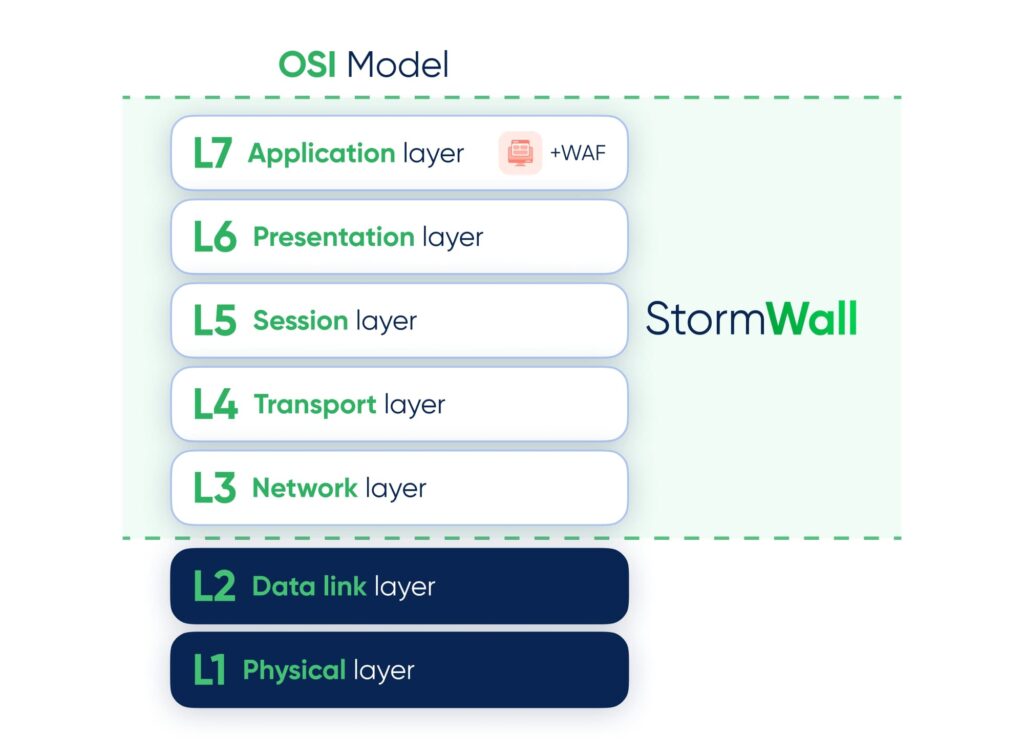
All devices and network protocols involved in data exchange are organized into seven OSI layers—from L1 to L7—each with clearly defined functions.
Although OSI isn’t the only networking model, the TCP/IP model is also widely used to describe the transport protocols of the modern internet. (Learn more: OSI vs TCP/IP Models: What’s the Difference?)
However, OSI is often preferred in cybersecurity because it offers greater detail and makes it easier to:
- Identify the specific layer to which a device, process, or issue belongs.
- Classify threats—attackers can target different OSI layers with DDoS attacks. Rather than a vague “the server is down,” you can immediately pinpoint a UDP flood (L4) or an HTTP flood (L7).
- Design precise security measures for each layer.
- Optimize resource usage during traffic filtering—by blocking an attack at L3 or L4, malicious traffic never reaches L7, preventing wasted CPU and memory resources.
This layered approach forms the foundation of any robust security architecture. That’s why the OSI model remains a key tool for security engineers and architects.
OSI Layers in Cybersecurity
The core strength of the OSI model lies in dividing the data transmission process into independent layers. Each layer can use its own tools, protocols, and security measures without affecting the others.
At a high level, the OSI model is divided into two clusters:
| Cluster | What it does | Where it operates |
| Upper layers (L4–L7) | Handle application logic and middleware—the software that processes requests and responses | On the host system or between the operating system and applications |
| Lower layers (L1–L3) | Handle the physical transmission of data across the network | On hardware—routers, switches, network adapters |
Let’s take a closer look at all seven OSI layers and the role each one plays.
Physical Layer (L1)
At the physical layer, data is transmitted as raw bits—ones and zeros—over a physical medium, such as:
- Electrical signals over copper cables.
- Light pulses through fiber-optic lines.
- Radio waves via Wi-Fi or Bluetooth.
Only physical attacks are possible here—cutting cables, causing radio interference, or inducing electrical faults. Classic DDoS attacks do not occur at L1 because there are no network or computational resources to overwhelm.
Data Link Layer (L2)
The data link layer transfers frames between two directly connected nodes. Bits from L1 are grouped into frames that contain sender and receiver MAC addresses.
Switches and network adapters operate at this layer.
L2 attacks aim to disrupt a local network segment or intercept legitimate traffic. Common examples include:
- MAC flooding. Overloading a switch with spoofed MAC addresses until it begins broadcasting all traffic to all ports.
- STP manipulation. Injecting malicious STP frames to destabilize switching paths.
- DHCP starvation/spoofing. Blocking legitimate clients or redirecting their traffic.
Network Layer (L3)
This layer handles IP addressing, packet routing, and selecting the optimal path for traffic. Routers operate at this layer, and protocols such as ARP map IP addresses to MAC addresses.
Typical DDoS attacks include:
- ICMP flood. Overwhelms gateways with large volumes of ICMP packets.
- Ping flood. Overloads the target with ping requests, causing service delays.
- Smurf attack. ICMP requests are sent to broadcast addresses with the victim’s IP spoofed as the sender, generating massive reply traffic that saturates network bandwidth.
Transport Layer (L4)
This layer establishes connections between applications and ensures reliable data delivery. It relies on the following protocols:
Typical DDoS attacks include:
- SYN flood. Generates a large number of half-open TCP connections, exhausting the server’s connection table and preventing legitimate connections.
- UDP flood. Sends high volumes of UDP packets to random or targeted ports, consuming bandwidth and server processing resources.
- Amplification attacks. Small spoofed requests trigger disproportionately large responses from DNS, NTP, or other public services, overwhelming the victim’s network infrastructure.
Session Layer (L5)
The session layer manages application sessions, controlling their establishment, maintenance, and termination, and enabling recovery from interruptions.
Protocols such as RPC, SIP, and RTP are commonly associated with this layer.
Layer 5 is rarely targeted in isolation, but session logic is frequently abused in multi-layer attacks:
- Session floods. Exhaust the server’s ability to maintain active sessions.
- Session hijacking. Bots keep sessions open by abusing authentication mechanisms.
- Session management abuse. Exploiting weaknesses in session creation, maintenance, or termination.
Presentation Layer (L6)
This layer converts data into standard formats (HTML, PNG, DOCX), handles media compression, and performs encryption and decryption. As a result, L6 plays a crucial role in data security.
Attackers often exploit resource-intensive operations, such as:
- Sending encryption or decryption requests.
- Sending highly compressible or malformed data.
- Exploiting complex parsing logic.
Application Layer (L7)
This layer is closest to the user, powering applications such as browsers, email clients, messengers, and web services. Key protocols include HTTP/HTTPS, DNS, FTP, and SSH.
Typical DDoS attacks include:
- HTTP flood. Overwhelms a web server with heavy HTTP requests.
- DNS flood. Bombards DNS servers with spoofed queries.
- Application vulnerability exploitation. Slow HTTP attacks, SQL injection used to exhaust resources.
- Application Logic Flood. Bots mimic legitimate users and execute long, resource-intensive workflows (e.g., repeatedly adding items to a shopping cart).
DDoS Protection Across OSI Layers
During transmission, data passes through all seven layers—from L7 down to L1 on the sender side, then from L1 up to L7 on the receiver side.
The challenge is that each layer has its own vulnerabilities.
- L1 relies on hardware reliability.
- L2 requires MAC and port controls.
- L3–L7 require advanced software defenses and professional anti-DDoS solutions.
Here are examples of protective measures for each OSI layer:
| Layer | DDoS Protection Measures |
| L3 | ▪️IP blocking ▪️Rate limiting ▪️Traffic filtering ▪️Verifying packet origin ▪️Dynamic BGP announcements for upstream filtering |
| L4 | ▪️SYN Cookies ▪️Limiting new connections ▪️Rate limiting ▪️Dropping invalid sessions ▪️Using scrubbing centers |
| L5 | ▪️Limiting sessions per IP ▪️Shorter session timeouts ▪️SSL/TLS renegotiation protection |
| L6 | ▪️Offloading encryption ▪️Updating protocols ▪️Disabling legacy versions ▪️Validating/cleaning data before processing |
| L7 | ▪️Deploying DDoS protection and a WAF (Web Application Firewall) ▪️Behavioral analysis ▪️Per-IP and per-URL request limits Read more: L7 DDoS Protection Guide |
Today’s attackers often launch multi-vector attacks targeting multiple layers simultaneously—commonly from L3 to L7.
StormWall provides multi-layered protection with solutions designed for your network and application needs. Our platform monitors traffic across all OSI layers in real time, automatically mitigating attacks while minimizing impact on legitimate users.

Network Protection from DDoS Attacks
- Activate protection within 10 minutes
- 24/7 technical support
