
 +44 20 3695 6722
 Sign in
We’re proud to introduce one of our most significant releases in recent years—a completely new approach to managing L3-L5 protection in the StormWall Client Portal. You can now segment your infrastructure yourself, create targeted filtering rules, and apply them to individual resource groups. All of this takes just a few clicks and doesn’t require contacting support.
We’ve released a major update to the StormWall Client Portal. The new Mitigations section is a set of tools that lets you create groups of servers and subnets and assign custom protection rules to them. The functionality is available for StormWall for Networks and StormWall for Servers across all plans.
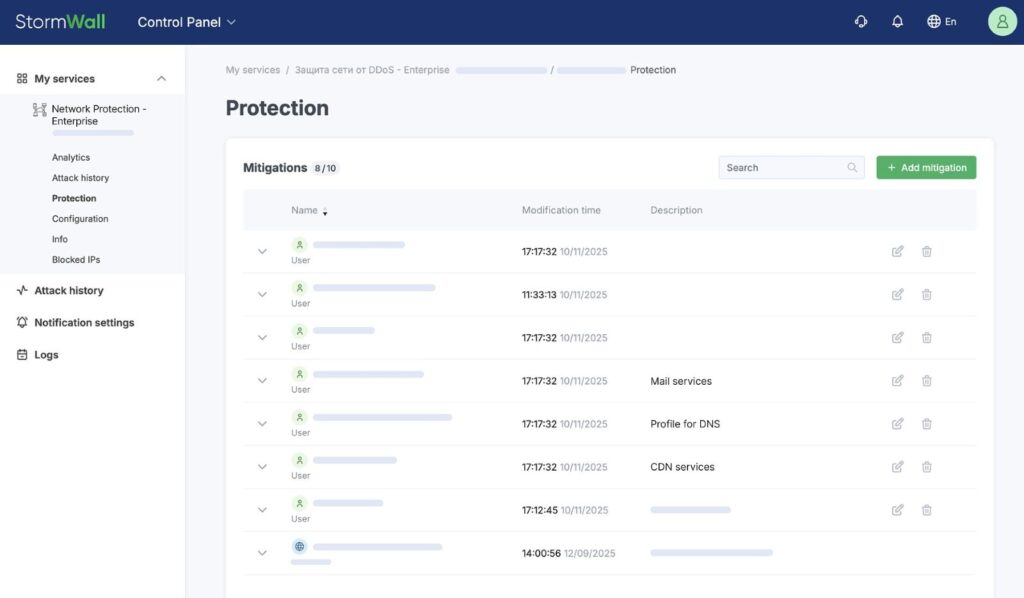
To start configuring protection using your own rules right now, connect via the API or log in to the Client Portal (Control Panel → Protection → Mitigations):
From Features — To Benefits
If you want to run unique protection scenarios, Mitigations will help you do that. Instead of applying the same filtering settings to all resources, you can:
1. Protect Network Segments Individually
Create separate mitigations for specific server and subnet groups and apply individual security rules to them.
When configuring protection, use:
- Default Mitigation — the baseline rule set that’s automatically designed for your services and immediately includes all your prefixes,
- Custom Mitigations — which let you form your own groups, create independent white/black lists, and define separate protection rules.
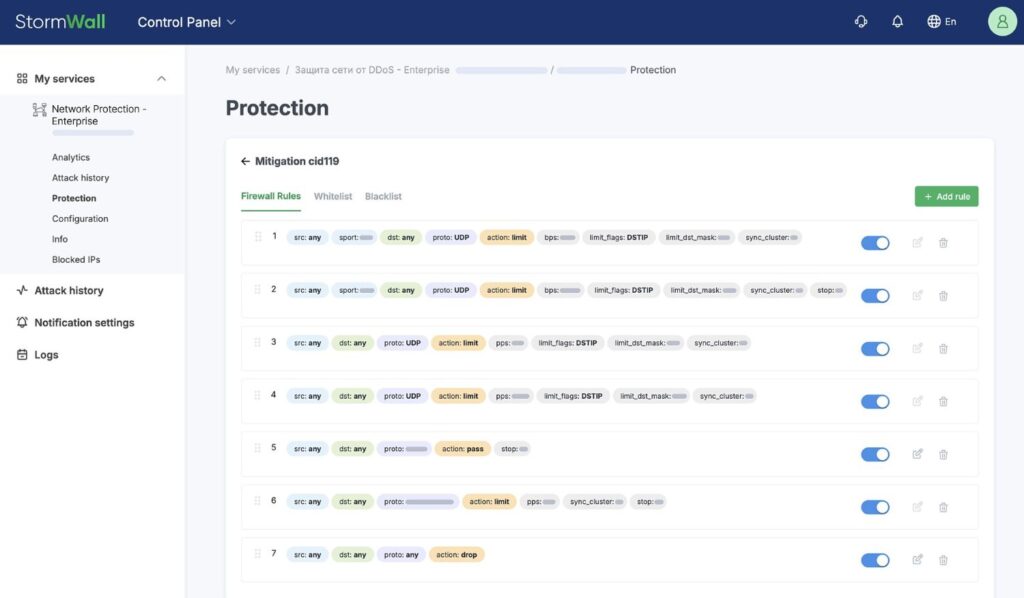
2. Define Filtering Rules in More Detail
To account for all nuances when protecting each segment, use additional configuration parameters:
- set traffic priority and action: Pass, Drop, or Bypass (skip subsequent checks),
- apply geo-filtering: allow or block traffic from specific countries,
- specify the required traffic by IP addresses, protocols, and ports.
Mitigation Use Cases
This functionality is particularly essential for precise tuning of DDoS protection. Here are two common scenarios:
1. Blocking All UDP Connections to a Specific Address
Suppose you have IoT devices or other network equipment with open UDP ports that aren’t used and may attract attackers. In such cases, fine-grained protection settings usually aren’t available.
Solution: in the updated StormWall Client Portal create a rule with the Drop action for the UDP protocol on the required IP address. You won’t need access to the device itself, and the whole process takes less than a minute.
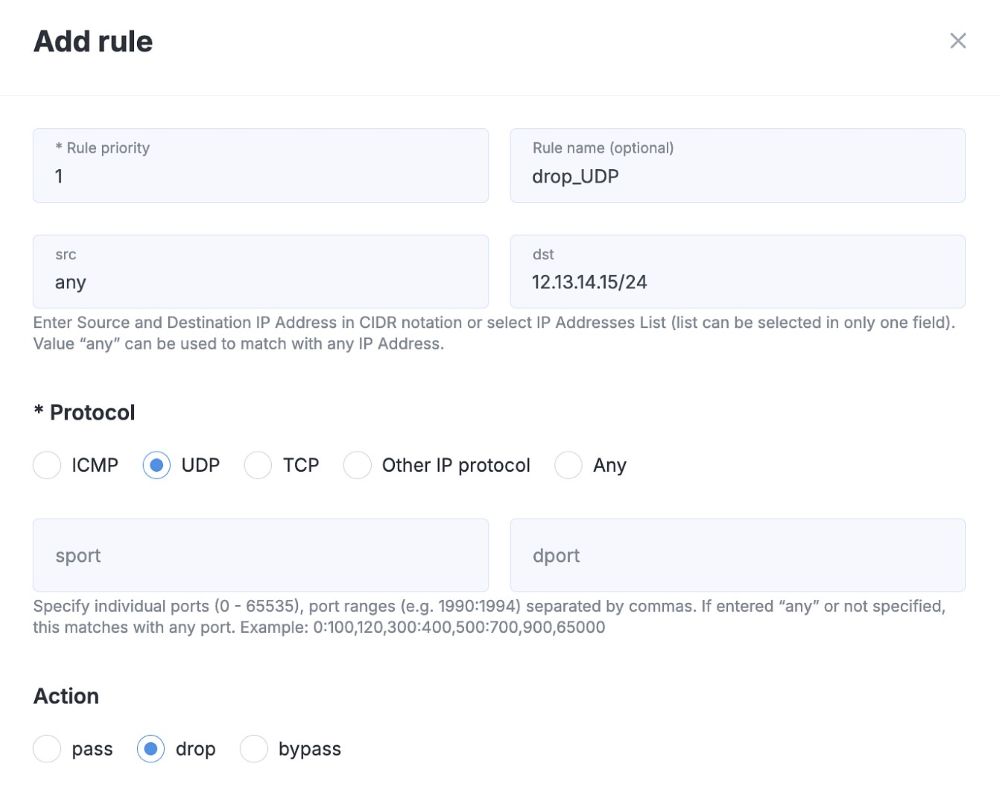
Results:
- instant protection: all UDP connections to the device are now blocked at our network level,
- reduced risk: attackers can no longer use those ports for attacks,
- improved stability of TCP services: they continue to operate normally without any limitations.
2. Allowing Only Specific TCP Ports
Another scenario: your server is used exclusively for web services, and you want to ensure that users can access only those services. Extra open ports aren’t needed as they expand the potential attack surface and increase the security risks for your entire network. So how do you restrict access to only the required TCP ports?
Solution: using the new functionality, create a separate rule. Specify TCP ports 80 (HTTP) and 443 (HTTPS), then set the action to Pass.
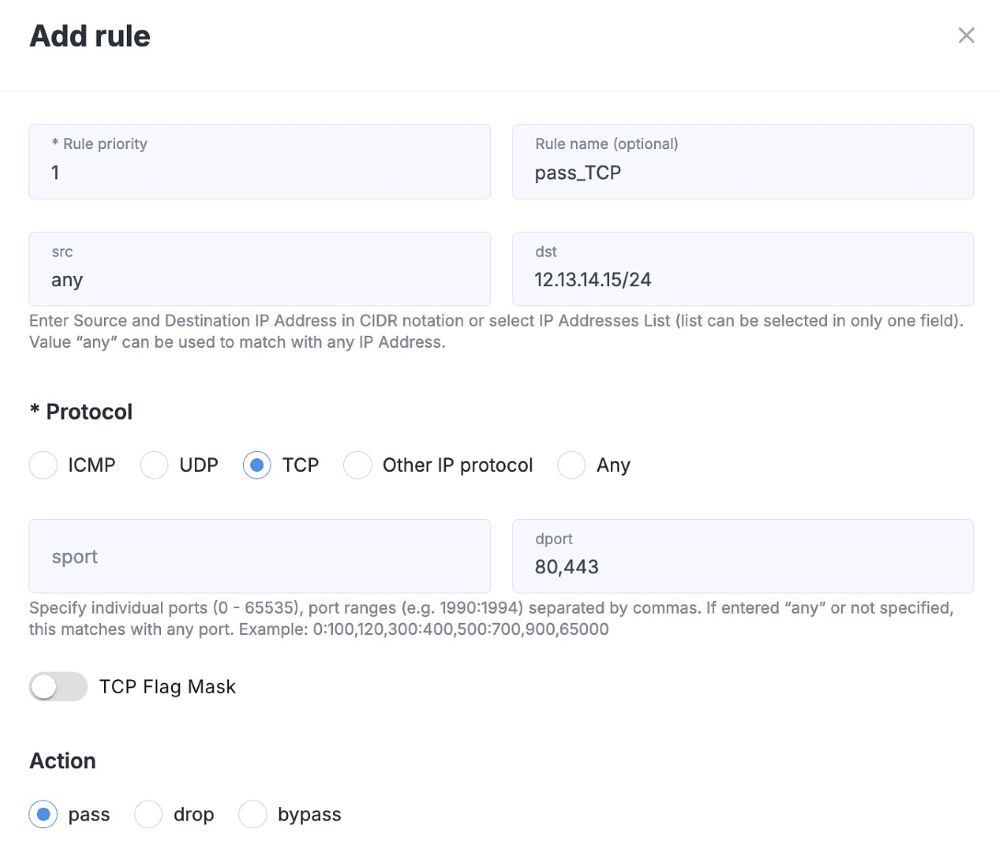
Results:
- access is restricted: only web services — websites, APIs, and web applications — remain available to users,
- security is strengthened: all other TCP ports are automatically blocked, while the rest of the traffic is processed according to the general filtering rules.
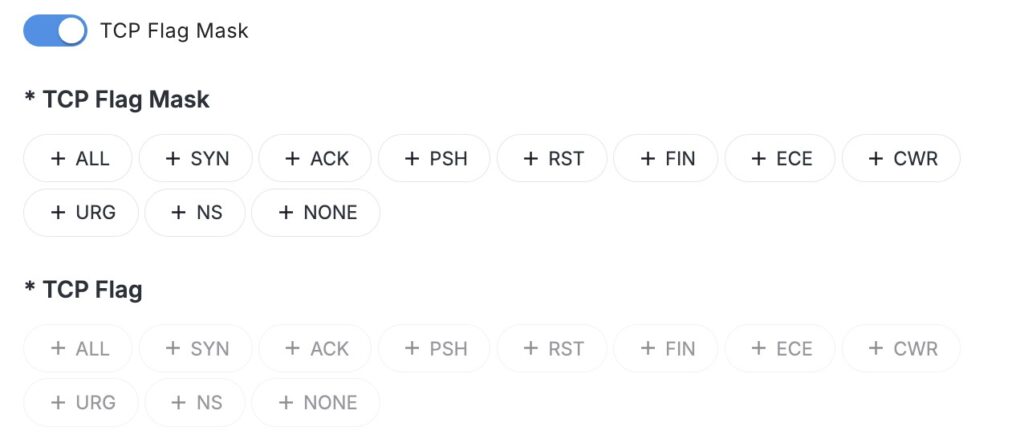
Additionally, you can enable the TCP Flag Mask to filter suspicious packets and strengthen security. For example, you can block packets with no flags, which are often used for stealth port scanning.
More to Come
You can start configuring network and service protection using your own rules today. For details on how to get started and what the new Mitigations tool can do, see our documentation.
This release is more than just a new section in the Client Portal. Mitigations introduce a new standard in protection management: instead of adapting to a predefined configuration, you build your own architecture for countering DDoS attacks.
In upcoming releases, we will continue developing this direction: you’ll get self-managed configuration of additional rule criteria and an AI-based detector that will help filter malicious traffic even more precisely. Step by step, the StormWall Client Portal is becoming a strategic control center for L3-L5 protection of your infrastructure.
We’ll share how this and other updates will help you strengthen your protection and simplify filtering configuration in our blog. Stay tuned!

Network Protection from DDoS Attacks
- Activate protection within 10 minutes
- 24/7 technical support
