
 +44 20 3695 6722
 Sign in
The new Report Scheduler is now available in the StormWall Client Portal. You can now receive up-to-date protection data for your resources by email not only on a regular basis, but also at the exact time that works best for you.
Try the new feature in your Client Portal: Control Panel → Report scheduler
With the Report Scheduler, you can easily:
1. Configure Reports to Match Your Workflow
Create a new scheduled report by clicking Add Schedule and set it up exactly the way you need.
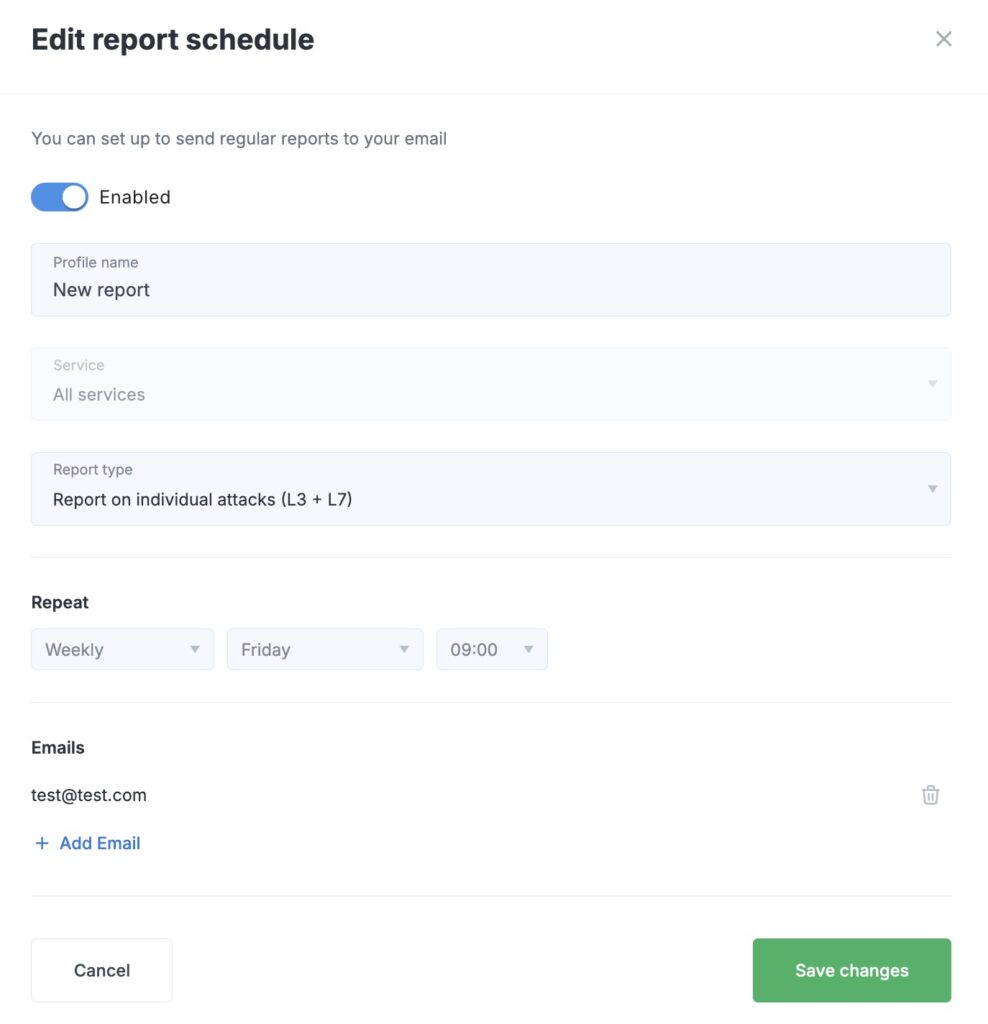
Available settings include:
- Profile name
Give your report a clear, descriptive name, such as Weekly Website Summary or L7 Attack Report.
- Service
Select the protected service from the dropdown list for which you want to receive scheduled reports.
- Report type
Choose the type of analytics you need:
– Summary reports on attacks — key statistics with links to detailed information for each attack.
– Report on individual attacks (L3 + L7) — a detailed breakdown of all incident types.
– Report on individual attacks (L3) — focused on network-layer attacks.
– Report on individual attacks (L7) — complete visibility into application-layer incidents.
- Repeat
Define how often and when the report should be sent. For example: Weekly, Friday, 18:00.
- Emails
Add up to 10 email addresses to receive the generated reports. This is especially useful for teams — no need to forward reports manually to colleagues.
2. Take Full Control of Your Reports
We understand that your reporting needs may change over time, so we’ve built simple tools to help you manage your schedules easily.
For convenient report management, you can:
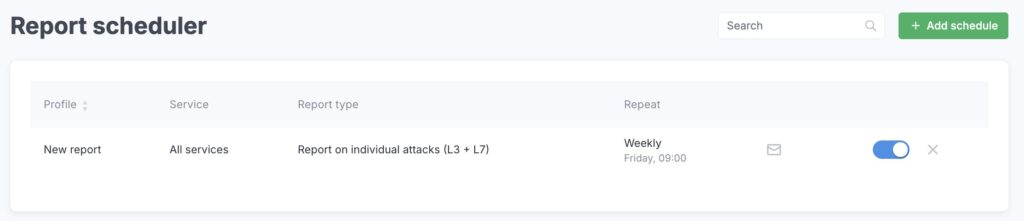
- Enable or disable reports in one click
Each scheduled report in the list has a toggle switch. If you no longer need a report temporarily, you can simply turn it off without deleting it. - Delete outdated reports
If a report is no longer relevant, you can remove it completely.
Use Case
Example 1: Regular Reporting for Management
Your management or security team needs weekly insights into mitigated DDoS attacks. Set up a Summary report on attacks to be generated every Friday at 17:00 and add the required email addresses. Your colleagues will automatically receive a ready-to-use weekly report, while you save time on manual data compilation and distribution.
Example 2: Monitoring a Specific Service
You have migrated several projects under our protection but want to monitor activity for one critical service only. Create a separate daily schedule for this service with a combined L3-L7 report and send it to your email. This way, you’ll always stay informed about what’s happening with your most important asset.
We continue to enhance our services so that your DDoS protection is not only reliable, but also fully transparent and easy to manage. The Report Scheduler is an important step in that direction. To stay up to date with the latest StormWall product updates, follow the news on our blog.

DDoS Protection for Websites
- Activate protection in 10 minutes
- 24/7 technical support
